
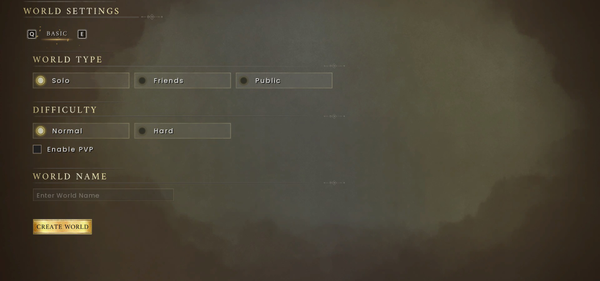
⚙️ Choose a supported world setup
Use the current world settings screen for Standard, Creative, Custom, friends-only, public and crossplay choices. Test an unfamiliar combination in a disposable world before using the multiplayer setup, dedicated server or save recovery workflow.
Separate supported world settings from unverified commands
Dragonwilds includes Standard, Creative and Custom worlds plus access settings such as friends-only and public. Choose the world type before testing a setting because Custom or Creative rules may intentionally change progression.
There is no verified general command list in the current material. Do not paste commands from another survival game or an old video into a live save; use the supported world setting or a clearly documented mod instead.
Test one setting with a visible result
Create a disposable world, change one setting, and prove the result with one visible action: gather a resource, craft an item, reload the world or invite a second player. If the result is not visible, return to the settings screen instead of guessing that a command worked.
Which settings are currently supported?
World settings are documented more reliably than console commands. Standard, Creative and Custom worlds support access modes for up to four players, with Normal/Hard differences for survival, XP, gravestones and enemy damage. There is no verified current command list here. Do not paste commands from another survival game or an old video into a live save.
For a command that is documented for your exact build, test it in the disposable world first. Otherwise use the supported setting or a compatible mod.
| Player goal | Safe answer surface | Verification signal |
|---|---|---|
| Change difficulty or progression rules | World creation or the current world settings screen | The selected value remains visible after leaving and reopening the world |
| Change access or multiplayer behaviour | World access/crossplay settings or the documented dedicated-server configuration | A second player can see and join the test world |
| Run an administrative console command | No general command is verified by the current local evidence | Do not publish or use guessed syntax; test only a command documented for the exact build |
| Change behaviour not exposed by settings | A compatible mod | The mod page states requirements and the save still loads in a backup world |
The useful answer is simple: use the world settings for normal play; use a command only when its exact syntax and support are documented for your build.
Apply the setting only after this check
Keep supported world modes and custom settings separate from experimental commands. Test any command in a disposable world, change one variable at a time and require a visible result before relying on it in a real save.
The check passes when the selected world setting remains visible after reopening the world, or when the documented command produces its stated result without damaging the disposable save. If neither happens, restore the backup and return to the supported settings screen.